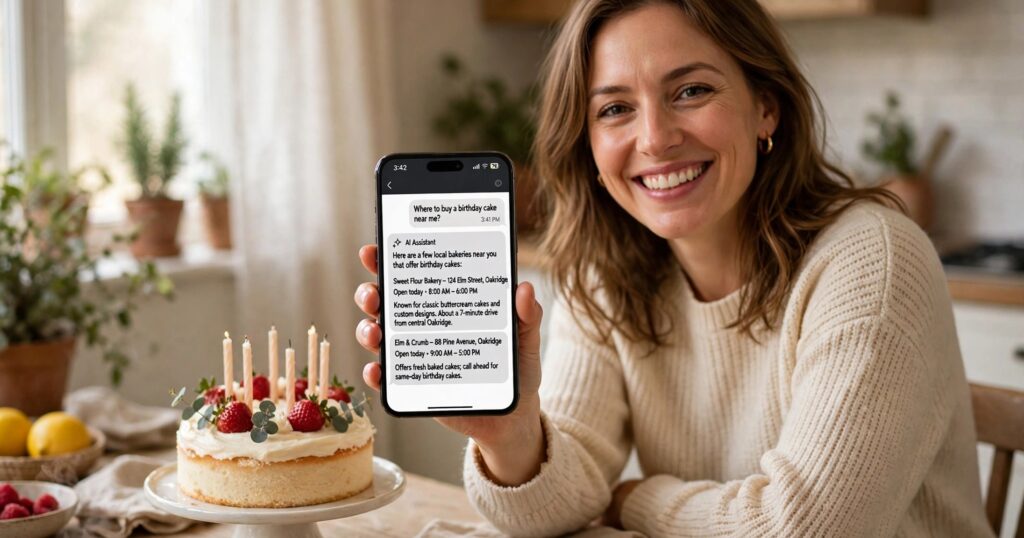
Take a bakery owner, who finds out about his own business from a customer. She asks ChatGPT where to buy a birthday cake near her, and ChatGPT names his bakery, gives the address, and tells her it closes at six. She arrives at half past five to a dark shop and a locked door, because his bakery closes at four on weekdays and ChatGPT has the hours wrong. She tells him the next morning, laughing about it, and he laughs too, until he realises he has never told ChatGPT anything at all. It has simply decided what his business is, from whatever it has found online, and it has decided wrong. That is the whole story of this article: ChatGPT is already talking about your business, with or without you, and claiming it is how you get a say in what it says.
In our example, he claims his bakery the same week, and the job is smaller than he expects and stranger than he expects in equal measure. Smaller, because the claim itself takes about fifteen minutes. Stranger, because the claim is only the first of two gates, and the second one asks for his identity documents before it will let him change a single word. This article walks you through both gates in order, tells you what to fix on your own website first, and ends with an honest answer to the only question that matters: claim now, or wait. I have not claimed a business on a live account for this article, and I am not going to pretend I did. What follows is built from OpenAI’s own announcement and help pages, checked live, and from the failure modes every independent guide since launch keeps tripping over.
What claiming actually does, and what it does not
OpenAI opened Businesses in ChatGPT in beta, and the pitch is simple: through a dashboard called Business Hub, businesses can claim their business, manage their information, and see insights on how people engage with them on ChatGPT. Once verified, you can update key details and add a product feed with pricing and availability. That is the offer, and for a business whose facts are wrong in ChatGPT today, it is worth taking. But hear the hard edge before you start: claiming does not guarantee higher placement or sales, and it does not give you control over ChatGPT’s independent recommendations. The OpenAI announcement is the source for the launch itself.
| What claiming gives you | What it does not give you |
|---|---|
| Control over the facts on your profile | Higher placement in answers |
| A product feed with prices and availability | A guarantee ChatGPT recommends your products |
| Counts of mentions and website clicks | Access to what people actually asked |
| Discovery topics from answers that cited you | Control over ChatGPT’s independent answers |
| A verified badge once identity checks pass | Protection from competitors being mentioned too |
That table is the article’s spine, and the right-hand column matters more than the left. If you claim your business expecting a flood of new customers, you will be disappointed, and you will blame the tool for a promise it never made. If you claim it expecting to correct wrong hours, wrong prices and a wrong description, you will get exactly what you came for. The bakery owner in our example does not claim his shop to rank higher. He claims it so the next customer will not stand outside a locked door at half past five. That is the right reason, and it is enough.
One more limit before you touch the dashboard. Alongside Business Hub, OpenAI added Business Agents, a branded chat assistant that customers can talk to inside ChatGPT about a business’s own products and policies. At launch, agents are available only to eligible ecommerce and online service businesses in the United States, with a website. A bakery in Ohio can claim its profile, and a consultancy in London can claim an online profile, but a florist in Toronto may have nothing to claim yet, since local shops outside the United States can claim only an existing listing. Until then: claim for accuracy, not for an agent.

Fix your website facts first
Here is the order of work that most guides get backwards: they start with the claim, while I start with the website, because ChatGPT does not only read what you type into Business Hub. OpenAI says so itself: ChatGPT may use other sources, and updates can take time to appear. If your website still says the wrong hours, the wrong prices or the wrong services, claiming the profile is like correcting a sign while the menu behind it still lies. Fix the source first, then claim the profile.
The bakery owner’s website is the real culprit in his story. His hours page has not been updated since he changed his weekday closing time, his cake page lists a flavour he has stopped making, and his delivery page says he delivers across the city when he has narrowed delivery to three neighbourhoods. ChatGPT has simply repeated the stale facts, confidently and wrongly. In our example, four pages get fixed before Business Hub is touched, and the table below is the list to work from.
| Fact to fix | Where it must be true | Why it matters |
|---|---|---|
| Opening hours, including holidays | Website and Google Business Profile | Wrong hours send customers to a locked door |
| What you sell, and what you stopped selling | Product and service pages | ChatGPT recommends what it thinks you stock |
| Prices and availability | Product pages and product feed | Stale prices become wrong quotes in answers |
| Delivery area and return policy | Website, in plain text | Agents cannot read facts locked inside an image |
| Business name, address and phone | Identical everywhere | Mismatched details slow verification down |
Two rows in that table deserve a second look. The first is the delivery and returns row, and the rule behind it is one I repeat in almost every article about being found by AI: put facts in plain text. An AI system cannot read a size chart, a returns policy or a price list that lives inside an image. If the fact matters to a buyer, it belongs in readable text on the page itself. The second is the identical-everywhere row: your business name, address and phone number should match character for character across your website, your Google Business Profile and your Business Hub profile, because mismatches stall verification.
Claiming a profile corrects the facts, but the facts have to exist somewhere worth reading first. Clear, consistent, plain-text facts on your own website are the foundation, as I wrote in my guide to becoming visible in AI search, and every dashboard you claim afterwards is built on top of them. Skip the foundation and the dashboard is decoration.
The fifteen-minute claim checklist
With the website fixed, the claim itself is straightforward, and the steps below follow OpenAI’s own help page in order. The claiming part genuinely fits inside a quarter of an hour for most businesses, and the waiting afterwards is OpenAI’s, not yours.
- Sign in to ChatGPT with the account you want to manage the business from, and open Business Hub from the sidebar.
- Search for your business by name, select the listing that matches, and confirm the account that will manage it.
- Choose one of the verification methods shown and follow the prompts. The options are in the table below.
- Wait for OpenAI to review the claim. You will get an email with the decision or a request for more information.
- Complete identity verification with Persona, using a government-issued ID, business registration information and proof you are authorised to represent the business.
- Once both approvals land, update your website, description, category, logo, delivery policy and return policy in the profile, and connect a product feed if you sell products, with prices and availability kept current.
- Open Insights, check the mentions, website clicks and discovery topics, and note the baseline before you change anything else.
| Verification method | What you need | Watch out for |
|---|---|---|
| Business phone | Access to the listed number for a code | Use the number customers actually call |
| Business email | Access to the business inbox for a code | A personal inbox will not prove the business |
| Website domain | Access to DNS to add a text record | Changes can take time to appear, so be patient |
| Shopify store | Access to the store admin to connect it | Connect the store that matches the business |
A few practical notes from the guides written by people who went through this in the first days after launch. If you received a claim invitation by email, open the personal link in it and sign in with the address that received it. If Business Hub tells you the listing is locked, select the contact support option. If someone has already claimed your business, do not start a second claim: open the profile, choose the dispute ownership option, and verify with Persona that you are authorised to represent it.
One warning belongs here rather than the fine print, because it is permanent. Only unpublished draft profiles can be deleted. OpenAI Support cannot delete, unpublish or hide a published profile, and if you use Persona to create a new profile, OpenAI’s approval automatically publishes it. So do not create a profile to see what it looks like. Create it when you are ready for it to be public, with the facts already fixed. In our example, the bakery owner creates his at the end of the afternoon, not the start, and that ordering saves him from publishing a draft with the old hours still on it.
The Persona gate, where most claims stall
Here is the part nobody warns you about, and it is why I keep saying the claim has two gates rather than one. Verifying your connection to the business gets you into Business Hub. It does not let you do anything useful once you are there. Before you can publish changes, view insights, connect a product feed or create an agent, you must complete identity verification with Persona, the identity service OpenAI uses. Claiming alone does not give your profile a verified badge. The blue check appears only after Persona approval.
Persona will ask for the kind of documents that make people pause: a government-issued ID, business registration information, and proof that you are authorised to represent the business. Have them ready before you start, and make sure the business name, address and any registration or tax number you provide match your official business records exactly. That matching is where most failures happen. A trading name on the claim and a registered name on the documents, an old address on one and a new address on the other, and the review comes back asking for more information. Each round of questions costs days, not minutes. Submitting information to Persona does not mean verification is approved. Wait for the email, and do not retry while a review is still running.
If a Persona check fails or expires, follow the instructions in the email you receive. If a retry option is available, use it and submit corrected information. In our example, the bakery owner passes Persona on the first attempt, and the reason is unglamorous: his documents match, and he has not tried to rush the claim while a review is already running, which is why boring preparation is the whole trick.

Three ways a claim fails, and the fix for each
Most failed claims fail in one of three ways, and each has a different fix. Knowing which one you are looking at saves you from trying the wrong fix three times and concluding the system is broken, when it is not broken, it is particular.
| Failure | What you see | The fix |
|---|---|---|
| ChatGPT cannot read your site | Your pages never appear in answers | Allow the search crawler in robots.txt, and check firewall rules too |
| Persona check stalls or fails | Edits, insights and the badge stay locked | Match every name and number to official records, then wait for review |
| Local shop outside the United States | No listing to claim, or no agent option | Claim the existing listing if one exists, and wait for the wider rollout |
The first failure is the most technical and the most misunderstood. ChatGPT finds pages through a search crawler, and there are two different crawlers with two different jobs. One collects content that may train future models. The other builds the index behind ChatGPT search. They are controlled separately, and blocking the training crawler does not block the search one. But a site that opts out of the search crawler will not be shown in ChatGPT search answers. The trap is the blanket block: a line in robots.txt that disallows every crawler, a firewall rule copied from a staging site, or a security plugin set to block AI bots as a group. Any of those can quietly remove your site from the answers your customers read, while your normal search rankings look completely fine. Before you claim, open your robots.txt file and confirm the search crawler is allowed, then check that no firewall or plugin overrides it.
The third failure is the one that is not your fault at all. Local stores and restaurants can currently claim only an existing United States listing, according to OpenAI’s help page. If you run a cafe in Manchester or a florist in Sydney and no listing exists for you, there may be nothing to claim yet, and no agent to publish either. That is a rollout limit, not a mistake you made. Make sure your website facts are clean and your Google Business Profile is accurate, so that when the listing appears you can claim it in minutes.
Reading your insights without fooling yourself
Once both gates pass, Business Hub opens a view no business owner has had before: ChatGPT telling you, in its own numbers, how often it mentions you. The insights cover activity over the past four weeks, and they come in three parts. Mentions count when ChatGPT references your website, for an online business, or shows a result for your location, for a local business. The brand name alone does not count for an online business. Website clicks count how often people click through to your site. Discovery topics show the common themes in answers that mentioned your business, grouped into categories rather than shown as individual prompts.
The discipline is in what you do not conclude from those numbers. You do not get to see individual prompts or conversations, including chats with your own business agent, and the discovery topics do not measure customer intent directly. A blank metric does not mean zero activity. It can mean the activity has not reached the reporting threshold, or the data is still being collected. And a rising mention count does not mean rising sales, because a mention counts a reference, not a purchase. In our example, the bakery owner compares his insights with what actually happens in the shop. The dashboard tells him whether ChatGPT talks about him. The till tells him whether it matters.
One more honest limit: ChatGPT may use other sources when it answers questions about your business, and updates can take time to appear. If you fix your hours on a Monday and ChatGPT still quotes the old ones on a Wednesday, that is normal speed, not a failure. I covered the broader job in my guide to making AI agents recommend your business, and the lesson is the same: consistency across your website, your listings and your claimed profiles is what makes the facts stick.
Claim your business in ChatGPT now, or wait
So the decision is simple: claim now if the facts about your business in ChatGPT are wrong, or if you sell products online and want a feed carrying your real prices and availability. Claim now if you want the baseline: the mention and click counts from before you change anything else. Claim now if you are the owner or the authorised representative, your documents match your records, and you have fifteen minutes with your website facts already fixed. Claiming costs nothing at launch, according to OpenAI’s launch briefing, and the worst outcome is that you learn ChatGPT barely mentions you yet.
| Your business | Claim now, or wait | Why |
|---|---|---|
| Online shop, United States | Claim now | Profile, feed and agent are all available to you |
| Online shop, elsewhere | Claim now | Profile and feed are available, agent comes later |
| Local shop, United States | Claim now | An existing listing can be claimed today |
| Local shop, elsewhere | Prepare, then claim | No listing may exist yet, so fix facts first |
| Service business, no products | Claim now | Correct facts and insights still apply to you |
Wait, or at least slow down, in only a few cases. Wait if your website facts are still wrong, because claiming first means publishing a profile built on stale information, and you cannot delete a published profile afterwards. Wait if you are not the owner or an authorised representative, because the claim will stall at verification and could complicate the real owner’s claim later. Wait if your documents do not match your records, and fix the mismatch first. And wait on the agent if you are outside the United States.
In our example, the bakery owner claims, passes both gates, and fixes his hours. The next customer who asks ChatGPT about a birthday cake gets the right closing time, arrives while the shop is open, and buys the cake. That is not a viral story, it is a small, repeatable one, and it is the honest size of what claiming your business does: it stops ChatGPT from getting you wrong, it shows you whether anyone is listening, and it gives you a verified profile to build on when the agent rollout reaches you. That is the whole job, and it is worth doing this week.
Frequently asked questions
How do I claim my business in ChatGPT?
Sign in to ChatGPT, open Business Hub from the sidebar, and search for your business by name. Select the matching listing, choose a verification method such as phone, business email, website domain or Shopify, and follow the prompts. After OpenAI approves the claim, complete identity verification with Persona before you can publish changes or view insights.
Does claiming my business make ChatGPT recommend it more often?
No, claiming lets you manage the information you provide about your business, but it does not guarantee increased visibility or give you direct control over ChatGPT’s independent recommendations. Advertising does not influence ChatGPT’s independent answers either. Claiming corrects your facts and shows you mentions and clicks, and that is what it is for.
What is Persona verification in ChatGPT Business Hub?
Persona is the identity check that unlocks editing, insights, product feeds and agents after your claim is approved. You may need a government-issued ID, business registration information, and proof you are authorised to represent the business. The verified badge, shown as a blue check, appears only after Persona approval.
Can a local shop outside the United States claim a business in ChatGPT?
Only if a listing already exists for it. Local stores and restaurants can currently claim only an existing United States listing, and Business Agents are limited to eligible ecommerce and online service businesses in the United States. Businesses elsewhere can claim an online profile where ChatGPT is available, and should keep their website facts clean while the rollout expands.
How many people use ChatGPT each week?
OpenAI says 1.2 billion people use ChatGPT each week. That is why a small error in the facts ChatGPT holds about your business can be repeated to an enormous audience.
Want your business found and described correctly by AI?
Book a one to one session and we will fix your website facts, claim your Business Hub profile, and set up the weekly check that tells you whether ChatGPT is actually sending you customers.
Book an AI Visibility Session